How to Restore Expired Domains with Wayback Machine
Priority Prospect
February 23, 2026
You have purchased domains with strong metrics and clean backlink profiles. Now you need to restore the content that made those domains valuable in the first place. This is where most operators hit a wall: manual restoration can take about 8-12 hours per domain. For a network of 20 or 50 domains, that's weeks or even months of work.
The challenge isn't just the time investment. Half-restored sites with broken images and missing pages undermine domain value; authoritative backlinks leading to 404s signal to search engines that the site's authority is gone.
But getting restoration right, manually, across many domains? That's the bottleneck.
Introducing the Wayback Machine Recovery Tool
At Priority Prospect, we have built our entire platform around one principle: remove friction from your PBN operations.
Our global IP network eliminated the IP diversity challenge. Our cloud firewall solved security concerns. Our hosting infrastructure handled the technical complexity of managing a large number of sites.
Now we are eliminating the website restoration bottleneck.
The Wayback Machine Recovery Tool automates the entire website restoration process for you. What used to take hours of manual work now takes only a couple of clicks.
How to start the website restoration process
We kept the tool's interface simple because when you're restoring a lot of domains, the last thing you need is complicated workflows.
Step 1: Access Website Restoration
From your Priority Prospect panel, click "Website Restoration" in the sidebar. This workspace keeps all your restoration projects organized, critical when you are managing a lot of domains.
Step 2: Initiate New Restoration
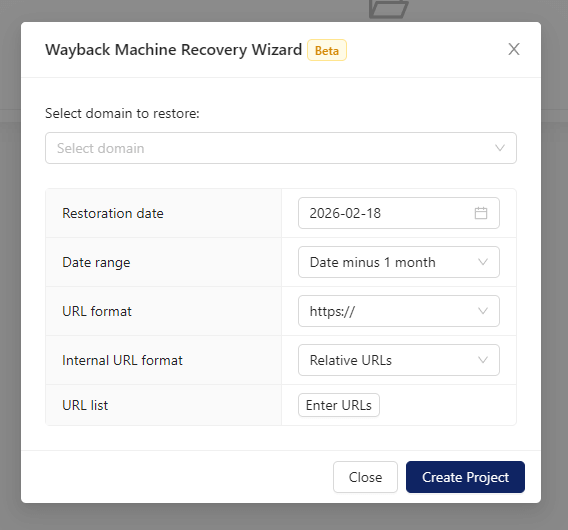
Click "Add Project" to begin. A new window will open, allowing you to select your configuration options.
Step 3: Select Target Domain
Next, select the domain from the system. If you have many domains, you can search for specific domains by typing the domain name into the domain selection box.
Step 4: Configure Restoration Parameters
Here's where the tool's intelligence becomes valuable. The Wayback Machine Recovery Wizard provides several configuration options:
Restoration Date: If you have researched the domain's history and know that a specific time period had the highest content quality or the best website coverage, enter a target date.
Date Range: Control the search window around your target date (default is up to 1 month before the selected restoration date). This flexibility is especially helpful when snapshot coverage is sparse.
URL Format: Specify whether to use http://, http://www. or https://, https://www. for the restored URLs to ensure compatibility with the original site structure.
Internal URL Format: Choose between relative URLs (recommended for portability) or absolute URLs depending on your needs.
URL List: If you have specific high-value pages you want to prioritize, you can submit a URL list. This is important for PBN operators who've analyzed backlink profiles and identified which pages actually drive the domain's authority.
If you don't specify custom options, the tool's discovery algorithm automatically identifies the most recent comprehensive snapshot and intelligently maps the site structure.
Step 5: Launch and Forget
Click "Create Project" to start the restoration in the background. You can set up as many projects as you wish at the same time.
Behind the scenes, the system does:
Querying Wayback Machine API for optimal snapshots
Downloading archived HTML, CSS, JavaScript, images, and other assets
Reconstructing internal linking and site structure
Fixing asset paths and broken references
Rebuilding the complete site in a staging environment
Deploying the restored website to your hosting account
You can monitor your website's restoration process live on the project's page.
Once restoration completes, you'll receive an email notification and can start building backlinks immediately.
Strategic Configuration for PBN Operators
Most restorations work perfectly with default settings. But certain situations benefit from custom configuration.
When to Specify Target Dates
Use Case 1 - Avoiding Spam Phases: You've acquired a domain that was legitimate for years, then had a spam phase before expiring. Specify a date before the spam started and adjust the date range to focus on that cleaner period.
Use Case 2 - Specific Content Quality: Your backlink analysis shows the domain had a particularly strong content period (lots of high-quality inbound links from 2019-2020). Target that period for restoration and narrow the date range to focus on peak quality.
Use Case 3 - Sparse Coverage: If Wayback Machine snapshots for your domain are infrequent, expand the date range (e.g., 3-6 months) to provide the tool with more snapshots to work with.
When to Use URL Lists
Use Case 1 - Backlink Mapping: You've exported the domain's backlink profile. The top 20 linking pages drive 80% of the domain's authority. Create a URL list of those specific pages to prioritize restoration.
Use Case 2 - Topical Relevance: You're using this PBN domain to support money sites in a specific sub-niche. Rather than restoring the entire site, restore only the pages relevant to that sub-niche to create a more focused PBN property.
Use Case 3 - Reduce maintenance overhead: For large domains with hundreds of pages, restoring everything can create significant maintenance overhead. Use URL lists to restore only high-value pages, keeping your PBN domains lean and manageable.
Avoiding Common PBN Restoration Pitfalls
Incomplete Wayback Machine Coverage: Not every page gets archived. Before purchasing a domain, check Wayback Machine coverage. If critical pages with strong backlinks are missing post-restoration, create improved versions rather than omitting those pages, or use a different date if possible.
Over-Restoration of Thin Content: Use URL lists to selectively restore only high-quality pages. For PBN purposes, 20-30 solid articles are better than 200 pages of mixed quality.
Inconsistent Restoration Quality: Accept that not every domain will restore perfectly. Grade restored domains into tiers (perfect, good, partial) and use them accordingly in your network strategy.
Ready to Scale Your PBN Operations?
Operators who can deploy networks faster, test strategies more aggressively, and scale without technical bottlenecks will dominate their niches. Speed and scale create competitive advantage.
Every day spent on manual restoration is a day your domains aren't passing link juice to your money site, and that's potentially lost revenue. If you're still in the early stages of building your network, our beginner's guide on how to set up a private blog network covers everything you need to get the foundations right before you scale.
So, don't wait! Start restoring your domains today! The Wayback Machine Recovery Tool is free for all Priority Prospect customers.
This account is utilized to share insightful content about succeeding and thriving within the SEO industry, with a particular focus on strategies for success with Priority Prospect.
You keep hearing the term PBN or Private Blog Network. Maybe you saw it mentioned in an SEO forum, spotted it in a competitor analysis, or came across it while trying to understand why certain sites rank so well despite thin content and no obvious outreach strategy. In this article, you will learn what a […]
The world of SEO is in a state of constant flux, and the past year has been particularly fascinating. As we move forward, it's more important than ever to keep an eye on the industry leaders who are paving the way and reshaping the landscape. In this article, we will highlight the top SEO experts […]
Private Blog Networks thrive on using diverse IP addresses from different subnets, often focusing on different C-class ranges. Although A-class and B-class IP addresses work fine, PBN operators prefer C-class IP addresses because they are more widely available and offer more options. If you want your PBN to flourish, paying attention to your IP address […]