How to Set Up a Private Blog Network - Beginner's Guide
Priority Prospect
October 30, 2023
In this guide, you'll learn how to build a PBN step by step, avoid common footprints, and create a network that looks natural, scalable, and built to last.
What Is a Private Blog Network?
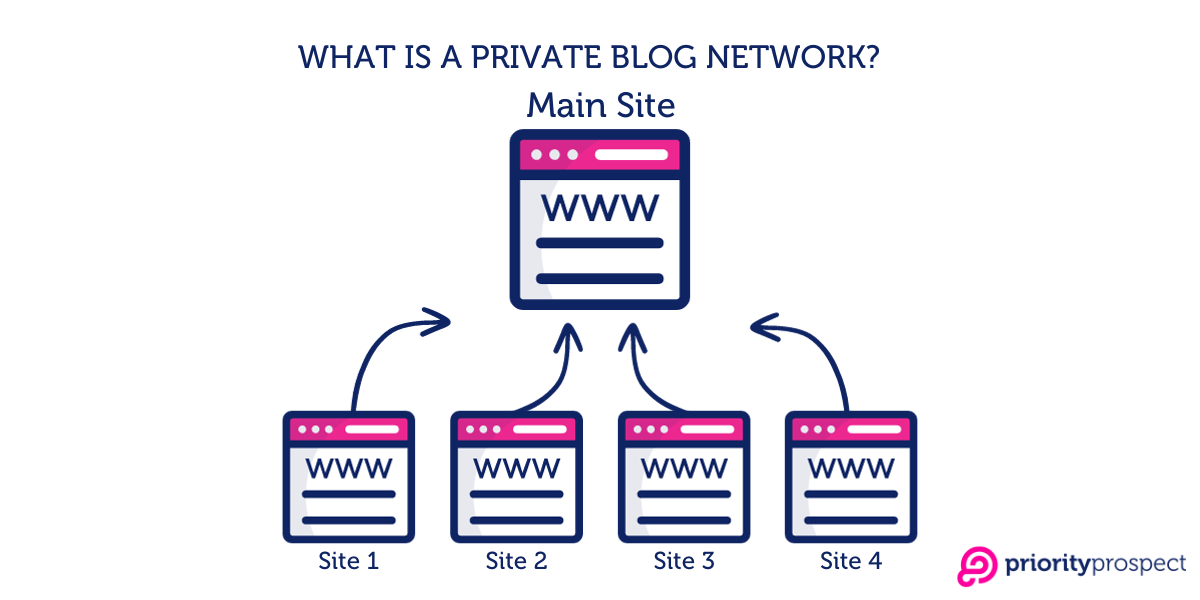
A Private Blog Network, or PBN, is a collection of websites you own and control, built specifically to send backlinks to one main website. The main site is called your money site.
The reason this matters comes down to how Google works. Google treats links like votes. When another website links to yours, it signals that your content is worth reading and worth ranking. The more credible the site that links, the more weight that vote carries.
With a PBN, you own the sites doing the voting. Instead of waiting and hoping other sites link to you naturally, you control the process: what links to your site, what anchor text is used, when the link goes live, and how many you add over time.
That control is the whole advantage.
Here's a simple way to picture it:
You buy 15 old domains that used to be real websites with real backlinks.
You rebuild each one as a small, legitimate-looking website in a related niche.
You publish real content on each site, then add links pointing to your money site.
Google sees 15 credible sites linking to your money site and pushes it up the rankings.
Before You Start: What You Need to Know
How Much Does a PBN Cost?
This is the question most guides skip. Be honest with yourself about the budget before you buy a single domain; underestimating costs is the main reason PBNs get abandoned halfway through, which can cause more harm than not building one at all. Plan for this upfront.
What You're Paying For
Typical Cost
Notes
Expired domain purchase
$50–$500+ each
The biggest variable. Better domains cost more and are worth it.
Hosting per site/month
$2–$10/site
Must be unique IPs - more on this in Step 2.
Domain renewal (annual)
$10–$15/domain
Easy to forget. Set calendar reminders now.
Content
$30–$150
Don't cut corners. Thin content gets flagged.
SEO tools (monthly)
$99–$399
Ahrefs or Semrush. Non-negotiable for research.
What Do You Need to Get Started?
Access to Ahrefs or Semrush for checking domain quality and tracking rankings
A budget for domains and PBN hosting; see the table above
A spreadsheet to track every domain, host, IP, and renewal date
Time to write or commission real content for each site
Patience, this is not something you build in a weekend
Step 1: Finding the Right Domains
This is the most important step in the whole process. A bad domain is a waste of money and time. A great domain can move your rankings on its own. Don't rush this.
You're looking for domains that were once real, active websites with genuine backlinks from real sites, that have since lapsed and are now available to register again.
This leads us to expired and aged domains.
Why should you focus on expired and aged domains?
A freshly registered domain has no history, no trust, and no backlinks — search engines ignore it for months while it slowly builds credibility. For a PBN, that's wasted time and money. Instead, you want an established domain that already has those signals baked in. There are two types worth knowing about:
Expired domains: These were once active websites that the owner let expire. Once a domain expires and isn't renewed, it eventually becomes available for anyone to register. If it had a real history and genuine backlinks, those signals carry over to whoever registers it next. This is the most common type used in PBNs.
Aged domains (auction domains): These are domains that have been registered and held, sometimes for years. They're sold on auction platforms, often with a pre-existing backlink profile. The advantage over expired domains is that the ownership is continuous, so there's no lapse in registration history. They tend to cost more, but a well-aged domain with clean links can be more valuable than an expired one and often easier to vet.
Both types give you something a fresh domain can't: a head start. The backlinks already exist, the domain already has index history, and the trust signals are already built in. When you build on top of that and add links to your money site, authority can start flowing almost immediately.
Where to Find Expired and Aged Domains
Auction platforms: DropCatch, GoDaddy Auctions, and NameJet are the most competitive sources but carry the widest selection of both expired and aged domains. Expect to pay a premium, but the quality is there if you know what to look for.
Closeout sales: Dynadot's closeout section or GoDaddy auctions regularly list expiring domains for $5–30 with far less bidding competition. A good place to find undervalued picks that most buyers overlook.
Aged domain brokers: Platforms like Odys Global and SerpDomains specialise in aged domains with verified backlink profiles. They're pre-vetted, which saves you research time.
Aggregator tools: Services like Catchdoms.com pull listings from multiple sources and display SEO metrics in one place. Saves hours of manual checking across different platforms and lets you filter by niche, DR, and referring domains.
Zone file scraping: An advanced method that lets you spot expiring domains before they hit the open market. Requires technical setup but gives you a first-mover advantage on good drops.
💡 The days of finding great domains on the big public expired domain lists are mostly over. Everyone checks the same databases. The best opportunities now come from auction platforms, closeout sales, and aggregator tools that surface less-obvious picks.
What Makes a Good Domain For Your PBN?
Not all expired or aged domains are worth buying. Before you spend anything, check every domain against these criteria:
✔️ Look for these ✔️ 2+ years of Wayback Machine history with consistent content ✔️ Real referring domains - actual businesses, blogs, or editorial sites ✔️ Niche matches your money site's topic ✔️ Domain hosted real content, not just redirects ✔️ DR 20+, with a low spam score ✔️ Backlinks grew naturally over time (no sudden spikes)
❌ Walk away if you see ❌ Gaps in Wayback history - often means ownership changed and links reset ❌ Casino, pharma, or foreign spam links in the backlink profile ❌ Thousands of links but very low DR - classic link farm pattern ❌ The domain was parked for years with no real content ❌ Previous manual penalty from Google ❌ Every backlink uses the exact same keyword as anchor text
💡 Don't get distracted by high Domain Rating scores alone. A domain with 50 real referring domains from genuine businesses passes far more value than a DR 40 with 500 spammy links. Always look at the quality of the links, not just the number.
How to Check a Domain Step by Step
When you find a domain you're interested in, run it through this process before buying:
Wayback Machine (archive.org): Go to archive.org and search the domain. You want to see 2+ years of consistent snapshots covering a clear, single topic. Look at the categories, article topics, and site structure. Gaps in the timeline are a warning sign - they often mean the domain changed hands, which can reset its link value.
Ahrefs or Semrush - backlink profile: Check the referring domains. Click through to a sample of them. Are they real websites? Blogs, businesses, news sites? Or are they foreign directories, link farms, or low quality websites? The latter are worthless and potentially harmful.
Google penalty check: Search site:domain.com on Google. If the domain was active recently but shows no results, it may have received a penalty. Also search the brand name itself - if it was a real website, traces of it should still appear somewhere in Google's index.
Spam Score (Moz): Run the domain through Moz's Link Explorer. Aim for a spam score under 5%. Anything above 10% is a red flag. Above 20%, skip it entirely.
Topical relevance: The domain's previous content should be related to your money site's niche. A domain that covers cooking has no value for a finance site. Relevance isn't just a nice-to-have; it's a core signal that affects how much authority the links actually pass.
💡 Before buying, note the specific time period when the domain looked its best in the Wayback Machine - peak content quality, most complete structure. You'll need that date when you restore it in Step 3.
Step 2: Setting Up PBN Hosting
Hosting is where most beginners leave their biggest footprints. If all your PBN sites are on the same server, with the same IP address and hosting account, they are most likely to be identified as a network. One manual review and Google can devalue all of them at once.
The goal is simple: each site needs to look like it was set up by a completely different, unrelated person.
What Is a Footprint and Why Does It Matter?
A footprint is any pattern that connects your PBN sites. Search engines don't just analyse link profiles in isolation - they look for clusters. If multiple sites share the same IP range, the same nameservers, and all link to the same money site, that pattern is detectable.
Footprint avoidance isn't about finding a single magic solution. It's a combination of small decisions that, together, make your network look like a collection of independent websites.
How to Handle Hosting with Priority Prospect?
The hosting problem boils down to one thing: every site in your network needs to look like it belongs to a completely different person, in a completely different place. That means unique IPs, varied server locations, and no shared infrastructure connecting your sites together.
Doing this manually, juggling 20+ separate hosting accounts, each with its own billing, panel, and IP allocation - works, but it becomes a significant operational burden as your network grows. Priority Prospect was built specifically to solve this.
Unique IP address per site. Priority Prospect assigns each site its own dedicated IP address. This is the single most important technical requirement for a clean network, and it's handled automatically. It's important that the IP address is from a unique C-class. A/B classes can also be considered, but there's not much difference.
Global IP network across multiple locations. You can choose IP addresses from different countries and regions. If your money site targets UK users, host some PBN websites in the UK. Targeting Germany? Put some websites there.
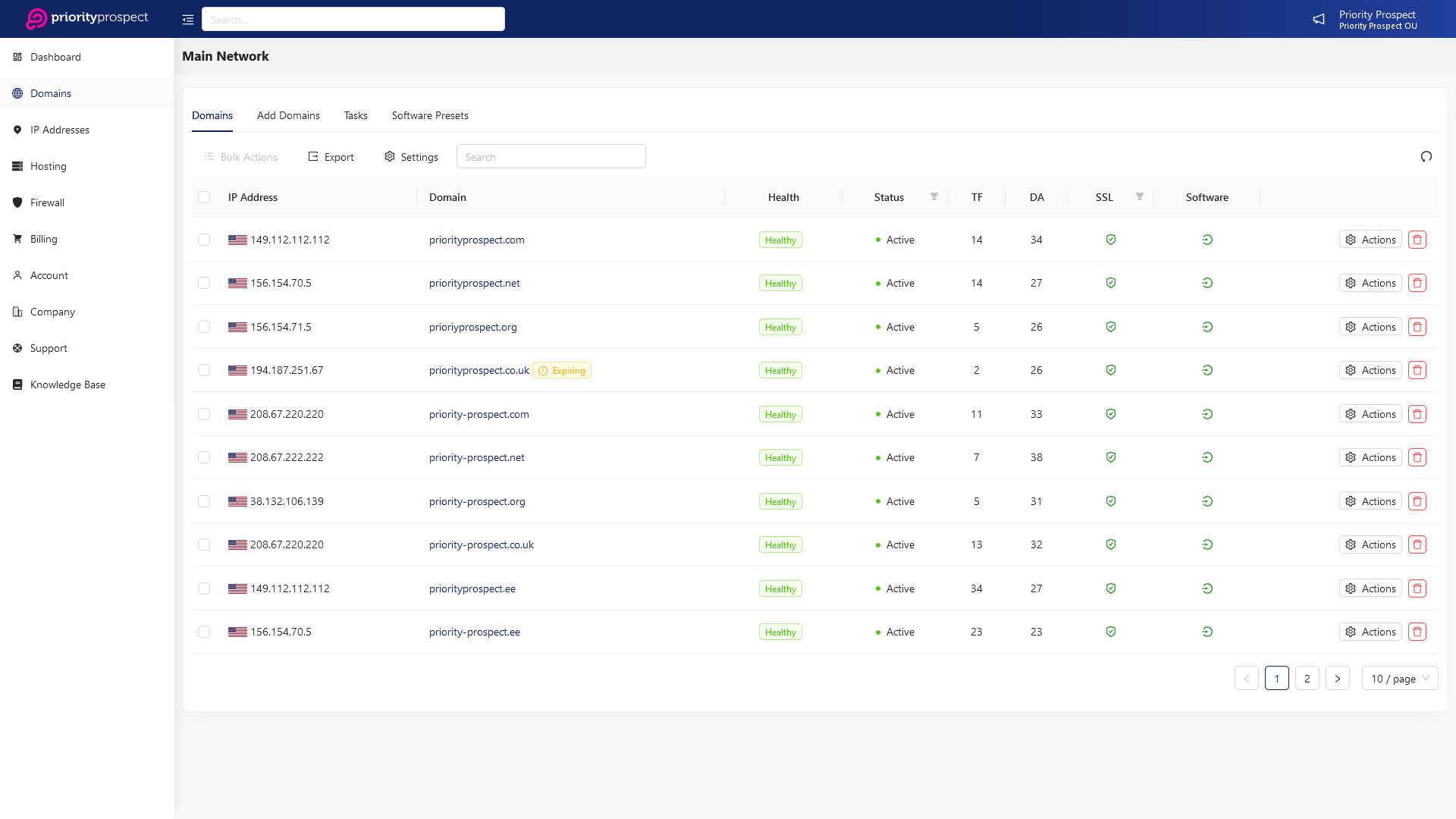
Everything is managed from one panel. Instead of logging into five different hosting dashboards, you can manage all your sites from a single Priority Prospect panel. You can see all your domains, IPs, and locations in one place, making your tracking spreadsheet much easier to maintain.
Built-in cloud firewall. Each site gets firewall protection included. This keeps your PBN sites secure without requiring separate security setup on each one.
Easy site setup. Spinning up a new site on a fresh IP takes a few clicks. When you're building a network of 20, 50, or 100 domains, the time this saves adds up fast.
What to Track in Your Spreadsheet
Start your tracking spreadsheet now, before you buy anything. For every domain, you need a record of:
Domain name and registrar
Hosting provider, server location, and IP address
Domain expiry date and hosting renewal date
CMS installed (WordPress, static site, etc.)
Theme used
WHOIS privacy: on or off
Which money site(s) receive links from this domain
⚠️ Missing a domain or hosting renewal is a real risk. Add renewal reminders to your calendar for every domain and hosting account!
Step 3: Building Your PBN Sites
Every PBN site needs to pass a basic credibility test: does it look like a real website, built and maintained by a real person? Not a parked domain with five thin posts and nothing else - an actual site with a clear topic, real pages, and some genuine effort behind it.
Search engines look for patterns that indicate the presence of automated or mass-produced content farms. Your sites need to look like they were built independently, not stamped out from a template.
CMS: What to Install
WordPress is the standard choice and for good reason; it's flexible, fast to configure, and produces sites that look and behave like normal websites. Install it on each domain and get it running.
If you want alternatives to WordPress, some good options include Ghost and Joomla.
💡 Avoid using the same WordPress theme and the same set of plugins across all your sites. These create technical fingerprints that are easy to detect at scale.
Restoring the Original Site with the Wayback Machine
One of the most effective things you can do with a newly acquired domain is restore it to its original content. This matters for two reasons: it immediately populates the site with topically relevant, historically indexed material, and it means the backlinks pointing to the domain land on real pages, not 404 errors.
Manually restoring a site from archived snapshots is possible but brutal. Downloading assets, fixing broken image paths, reconstructing internal links, and rebuilding the site structure across even a single domain can take 8–12 hours. Across 20 domains, that's weeks of work before you've added a single link.
💡 Priority Prospect's Wayback Machine Recovery Tool automates the entire restoration process. Just select a domain and target date, and it restores the site by downloading archived HTML, CSS, images, and assets, fixing broken references, and deploying a fully restored version. Free for all Priority Prospect customers.
How to use it:
Log in to your Priority Prospect panel and click “Website Restoration” in the sidebar.
Click “Add Project” and select the domain you want to restore.
Set your target date; this is where your Wayback Machine research from Step 1 pays off. Enter the date when the site had its best content and structure.
Optionally, supply a URL list of the specific pages that matter most; typically, the pages that your backlink research shows are receiving the most inbound links. Restoring those pages first ensures that the links pointing to the domain actually lead to real content.
Click “Create Project”. The tool runs in the background; you'll get an email when the restoration is complete.
⚠️ Not every page gets archived by the Wayback Machine. If critical pages with strong backlinks are missing after restoration, create improved versions of those pages manually rather than leaving them as 404s. Backlinks pointing to dead pages pass no value.
Smart Restoration: What to Prioritise
You don't need to restore every page on the old site. In fact, restoring hundreds of low-quality pages creates unnecessary maintenance overhead. Instead, be selective:
Prioritise the pages that your backlink analysis shows are receiving the most inbound links; these are the pages actually driving the domain's authority.
If the domain had a spam phase before it expired, use the target date feature to restore content from before that period only.
For a clean, manageable PBN site, 20–30 solid restored pages are better than 200 pages of mixed quality.
Grade each restored domain honestly; some will restore perfectly, others partially. Use them in your network accordingly based on restoration quality.
What Every PBN Site Needs
Before you publish a single article or add a single link, make sure each site has all of the following:
An About page: Write a brief description of what the site is about and who runs it. It doesn't need to be long; three or four sentences are enough. Use a realistic author name, not your real name.
A Contact page: Include a contact form or email address. Sites without any contact information look unfinished.
A Privacy Policy: You need a Privacy Policy to make your website look trustworthy and, in some cases, to follow legal rules. You can use a free online generator to quickly create one that fits your website.
A sitemap: Install an SEO plugin like Yoast or Rank Math that auto-generates one. This also helps with indexation.
A unique theme: Don't use the same theme on two sites. Spend a small amount on a few different premium themes, or choose clearly different free themes. Identical visual design across multiple sites is a detectable footprint.
Varied plugins: Don't install the exact same plugin stack on every site. Vary your choices for forms, SEO, caching, and so on.
Step 4: Creating Content
Content is where many PBNs fall apart. Thin, spun, or AI-generated filler is one of the clearest signals of a low-quality site.
The good news: good content does more than just keep your site safe. Well-written, useful articles can attract real organic traffic, earn genuine backlinks, and make your PBN sites look more credible to both Google and any manual reviewer.
How Much Content Before You Add Links?
This is one of the most common mistakes beginners make: building a site, publishing two posts, and immediately adding a link to their money site.
A website with only two articles and one link to a money site obviously looks like it exists only to promote that link.
Instead:
Publish 10–15 articles before you add any links to your money site
Wait at least 30 days after launching the site before adding the first link
Let Google discover and index the site naturally over those first few weeks; don't force it
💡 The 30-day wait feels frustrating when you're eager to see results, but it's one of the most effective safeguards against early detection. A new site that immediately links out to a money site is a red flag pattern.
Content Guidelines
Length: At least 800–1,200 words per article, more is better. Short, thin posts attract scrutiny. Longer posts with real input are more credible.
Topic focus: Every site should cover one clear subject area. A cooking blog publishes cooking content. A finance blog covers money topics. Don't mix unrelated topics on the same site.
Uniqueness: Every article across every PBN site needs to be original. Running the same content through a spinner and posting it across 20 sites is one of the most obvious footprints possible.
Quality: The writing doesn't need to be outstanding, but it needs to be coherent and useful. Real headings, real sentences, real value. No keyword soup.
Images and formatting: Include at least one image per post, use subheadings to break up content, and format it like a real article. Sites that look professionally produced get more benefit of the doubt.
Outbound links in content: Link out to other real, authoritative sources within your articles; Wikipedia, industry publications, relevant news sites. A site that only ever links to your money site looks suspicious.
💡 If you're outsourcing content, brief your writers on the site's niche and the quality bar you need. Cheap bulk content is usually obvious. Budget for decent writing - it's a small cost relative to what you spend on domains and hosting.
Step 5: Adding Links
This is what the whole network is built for, but it's also where the most damage gets done if you rush it or get it wrong. Adding links in an unnatural pattern is the most common reason PBNs get caught.
The Core Rules
One link per PBN domain to your money site. More than one outbound link to the same money site from the same domain starts to look like a link site, not a real website.
Wait 30 days after launching each site. As covered in Step 4, don't add links until the site has a content history and has been indexed for at least a month.
Roll links out gradually. Don't activate 20 new links in one week. Add a few per week across your network and let the effect build naturally.
Embed links in body content. Links in footers, sidebars, or widgets look unnatural. In-content links within a relevant article look editorial - which is exactly what you want.
Never link PBN sites to each other. Cross-linking your own network creates a detectable web of connections. Each site should appear completely unrelated to the others.
Anchor Text: Why It Matters and How to Get It Right
Anchor text is the clickable words in a link. If every single link pointing to your money site uses the same exact keyword phrase, Google may flag it as unnatural, because real editorial links don't work that way. Real links use all kinds of anchor text.
You can follow this example distribution across your PBN links. Note that all of the links you create, must look organic and real.
Anchor Text Type
Target %
What It Looks Like
Branded
30–40%
Your brand name - "YourSite" or "YourBrand.com"
Naked URL
15–20%
Just the URL - "yoursite.com"
Generic
20–30%
"this article", "read more", "click here"
Partial match
10–15%
Part of your keyword - "tips for PBN hosting"
Exact match
5–10%
Your target keyword - use sparingly
⚠️ Exact match anchor text is the easiest pattern for Google to detect. Keep it to no more than 10% of your total links. If every PBN link says "buy best plants", that's not an editorial link profile - it's a manipulation signal.
Step 6: Ongoing Maintenance
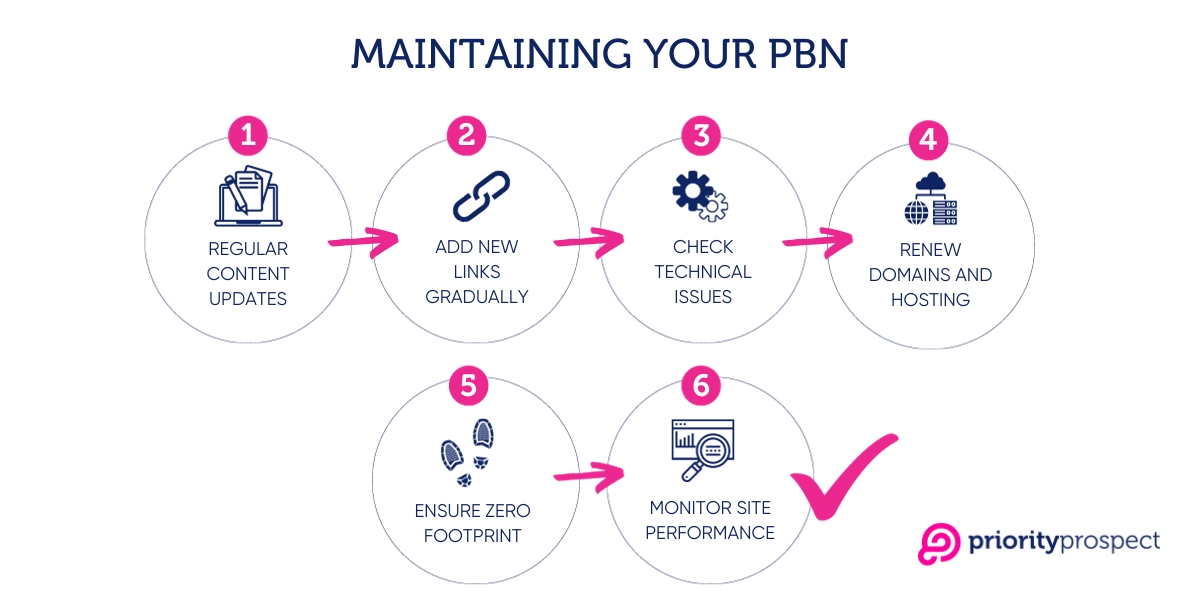
A PBN isn't something you build and forget. Sites that stop being updated get lower engagement signals. Domains that expire get snapped up by others. Deindexed sites stop passing value and may actively hurt you if you don't catch them.
The maintenance workload isn't huge, but it has to be consistent.
What to Do Every Month
Check all sites are loading - use a free uptime monitor like UptimeRobot
Spot-check indexation: search site:yourdomain.com or use an automated tool
Publish at least one new article on each site
Fix any broken links or 404 errors
Update WordPress, themes, and plugins on all sites
Review your money site's target keyword rankings
Check domain and hosting renewals due in the next 90 days
Keeping Sites Indexed
If a PBN site isn't indexed by Google, it provides no value. Here's how to keep sites indexed:
Publish new content regularly - at least once a month per site
Avoid duplicate or low-quality content - both will get pages excluded from the index
Build the occasional low-risk external link to your PBN sites - a social media profile, a forum post, a blog comment. Small signals of legitimacy help.
F.A.Q
What is a Private Blog Network?
A Private Blog Network (PBN) is an SEO strategy used to improve a website's ranking. It involves creating or acquiring authoritative websites, typically by purchasing domains with strong backlink profiles. These domains are then used to build links to a target website (a.k.a. money site) to boost its search engine rankings.
Is building a PBN safe for SEO?
Yes, building a PBN can be effective for SEO, but its safety depends on how well it is executed. To maintain safety, it's essential to treat each PBN site as a standalone, legitimate website, ensuring high-quality content and careful management of outbound links.
How many sites should be in a PBN?
The number of sites in a PBN depends on your goals and budget. A small network may start with 10–30 sites, while an average setup ranges from 30–50 domains. Larger networks can scale to a few hundred domains or more.
Should I use expired domains or fresh domains for my PBN?
You should use expired domains for your PBN because they already have an established backlink profile, authority, and potential ranking power. A well-selected domain with a clean history and strong backlinks can pass link equity faster than a brand-new domain. Fresh domains should not be used for PBNs because they lack backlink history and require significant time to build authority.
What hosting should I use for a PBN?
You should use hosting that provides unique IP addresses and diverse locations for your PBN. While shared hosting may seem cheaper, it poses risks because multiple sites often share the same IP range. A dedicated PBN hosting provider, such as Priority Prospect, is designed to host PBNs of any scale.
How do I prevent PBN footprints?
You can prevent footprints in your PBN by using different hosting providers or a PBN hosting service, as well as IP addresses, registrars, and WHOIS details. Vary your CMS, themes, plugins, and site structures. Content should be unique, and link patterns should appear natural. Do not interlink PBN sites, as this creates a detectable footprint.
Can I link multiple money sites from one PBN?
Yes, you can link multiple money sites from a single PBN, but it must be done carefully to avoid leaving footprints. A safer approach is to segment your PBN, assigning different groups of PBN sites to specific money sites. This way, each money site has its own unique backlink sources, reducing the likelihood of detection.
How do I keep my PBN sites indexed on Google?
You can keep your PBN sites indexed on Google by publishing fresh, unique content regularly. Avoid duplicate or low-quality content. To maintain credibility, follow standard SEO practices, such as social media sharing and occasional high-quality external backlinks.
How often should I update PBN sites with content?
You should post new content on your PBN sites every few weeks, or at least once a month, to keep them active. Consistent updates signal to search engines that the site is legitimate and regularly maintained.
What are the risks of using a PBN?
The risks of using a PBN include Google penalties, which can lead to ranking drops or complete deindexing of the PBN (which is rare). If Google detects an unnatural link pattern, it may apply a manual action, reducing the effectiveness of your network.
Should I use different registrars for my PBN domains?
Yes, using different domain registrars helps reduce footprints. Registering all domains under the same provider with identical WHOIS details creates a footprint that search engines may recognize. Using multiple registrars and enabling WHOIS privacy adds an extra layer of diversity.
How much does it cost to build and maintain a PBN?
The most significant initial expenses include buying domains (typically $50 to $500+ per domain) and PBN hosting (around $2 to $10 per site per month). Ongoing maintenance costs include hosting, domain renewals, and content updates. Depending on hosting choices, keeping a 10-site PBN active may cost $300 to $1,000 per year. More extensive networks with hundreds or thousands of sites can cost tens of thousands of dollars annually.
How do I track the effectiveness of my PBN?
You can track the effectiveness of your PBN by monitoring your money site's keyword rankings using tools like Ahrefs or Google Search Console. If rankings improve after adding PBN links, it indicates that the network is passing link equity. Additionally, check that search engines index your PBN pages and links, as non-indexed sites won't contribute to your rankings.
What should you do if a PBN site gets deindexed?
If a PBN site is deindexed, first confirm it by searching for site:yourdomain.com on Google. If the site doesn't appear, it has likely been removed from the index. Next, remove links from the deindexed PBN site to prevent Google from associating it with your money site. In many cases, the domain can be recovered by addressing potential issues such as thin content, over-optimized links, or hosting footprints. Before abandoning the domain, try to make it look more natural and request a reindex.
Final Thoughts
A PBN building is a long game. The networks that get caught are the ones built with shortcuts: cheap domains, shared IPs, thin content, and links added all at once. The ones that last for years are built to look completely legitimate, because in most meaningful ways, they are.
Every decision you make throughout this process should pass one simple test: would an independent, unrelated website owner make this exact same choice? If the answer is yes, you're building it right.
Take your time on domain selection. Be deliberate about hosting. Invest in real content. Add links slowly. Maintain consistently. That's the whole formula.
Ready to build your network on solid infrastructure?
Priority Prospect provides dedicated PBN hosting with unique IP addresses across multiple locations; purpose-built so you can focus on building your network, not managing server accounts.
This account is utilized to share insightful content about succeeding and thriving within the SEO industry, with a particular focus on strategies for success with Priority Prospect.
You keep hearing the term PBN or Private Blog Network. Maybe you saw it mentioned in an SEO forum, spotted it in a competitor analysis, or came across it while trying to understand why certain sites rank so well despite thin content and no obvious outreach strategy. In this article, you will learn what a […]
You have purchased domains with strong metrics and clean backlink profiles. Now you need to restore the content that made those domains valuable in the first place. This is where most operators hit a wall: manual restoration can take about 8-12 hours per domain. For a network of 20 or 50 domains, that's weeks or […]
The world of SEO is in a state of constant flux, and the past year has been particularly fascinating. As we move forward, it's more important than ever to keep an eye on the industry leaders who are paving the way and reshaping the landscape. In this article, we will highlight the top SEO experts […]