Today, we're excited to announce a long-awaited feature: Content Rules.
It's one of the most advanced features we've built, giving you precise control over what different visitors receive from your websites.
What are Content Rules?
Content Rules let you replace text, add or remove HTML, or serve a complete page from another URL. These changes affect only the response sent to the visitor. The existing content stored on your website, including your WordPress posts, remains unchanged.
Each rule consists of conditions and an action. Conditions determine when the rule applies, such as when a request comes from a specific country or matches a particular bot. The action determines how to change the response when those conditions are met.
You can apply rules across your whole site, within a particular directory, or on selected pages. You can also exclude pages, schedule a rule's start and expiration, and set priorities to control the order in which matching rules run.
How can I use Content Rules?
Here are a few examples of what you can do with Content Rules.
Automatically modify content across multiple pages
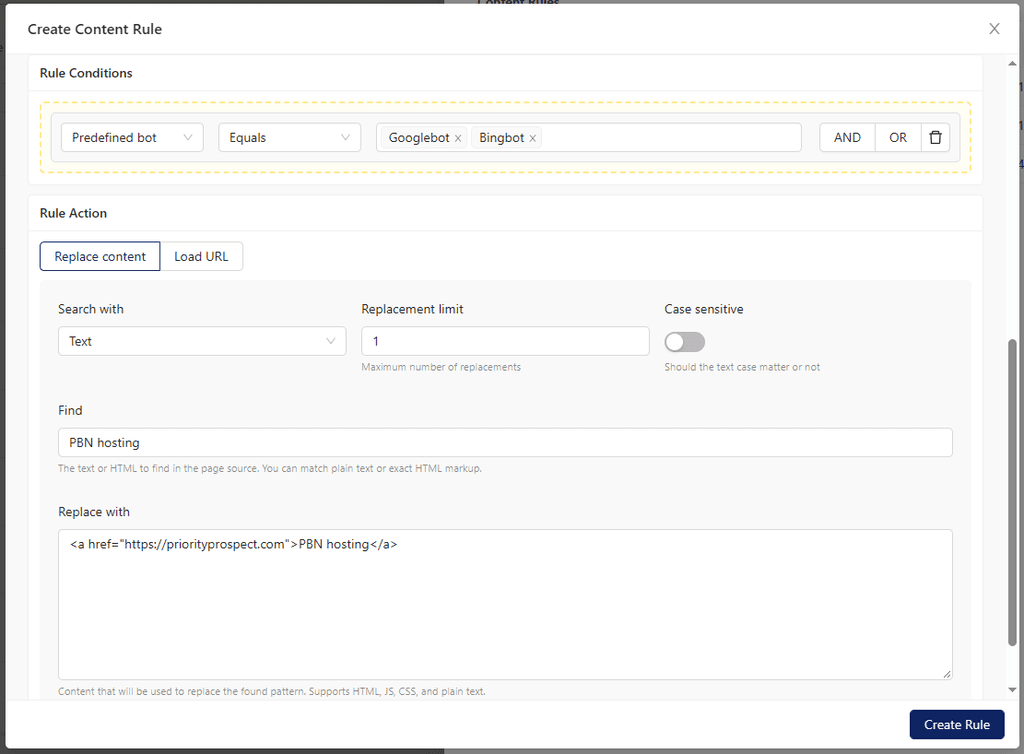
Suppose a site has five articles mentioning "Priority Prospect". Instead of editing every article individually, you could create a rule that turns those unlinked mentions into links:
The Replace content action searches the HTML response and replaces matching content with the value you provide. You can match literal text or use a regular expression for more advanced patterns.
The same rule can apply across multiple pages, while the underlying content remains untouched.
You can use this approach to insert banners, update affiliate links, add tracking code, replace outdated disclaimers, remove HTML blocks, and make other changes across your site.
Show different content based on visitor location
An affiliate site might have a page targeting visitors from several countries. Instead of maintaining separate pages, you could use Content Rules to customize a section based on the visitor's country.
For example, visitors from the UK could receive the heading:
Compare UK providers
While visitors from Canada receive:
Compare Canadian providers
Each rule replaces only the relevant section. The rest of the page stays the same, and visitors who don't match either rule receive the original heading.
This lets you maintain shared content in one place while tailoring specific sections for different audiences.
Control who receives your links
Suppose you want Googlebot to see certain links while keeping them hidden from competitors and other visitors.
You could create a rule that matches the predefined Googlebot condition and uses the Replace content action to add links to the response. For example, the rule could turn selected text into a link or replace an existing HTML block with one containing your links.
Only requests matching the Googlebot condition receive the added links. Other visitors and crawlers receive the original content.
The links are added to matching responses without editing your original pages or installing additional plugins.
Serve a completely different page when conditions match
Content Rules aren't limited to changing individual words or HTML blocks. With the Load URL action, you can replace the entire response with content fetched from another URL.
For example, you could maintain an alternative landing page for visitors from Canada and configure a rule to serve its content when a request matches that country condition.
You can also combine conditions to target more specific requests. Everyone else continues receiving the site's regular page.
This gives you control over the entire response while allowing you to maintain the alternative content separately from the original page.
Getting started with Content Rules
Content Rules are available now in your Priority Prospect account. Open your domain's detail view and select the Content Rules tab to create your first rule.
Give Content Rules a try, and let us know what you think! If you have questions or need help setting up a rule, our technical support team is available 24/7.
This account is utilized to share insightful content about succeeding and thriving within the SEO industry, with a particular focus on strategies for success with Priority Prospect.
We're excited to announce that Priority Prospect will be attending SEO Estonia 2026, taking place July 9-11 at Kultuurikatel in Tallinn, Estonia. As an Estonian company, SEO Estonia has always been a special event for us because it's our home event. It's always a pleasure to welcome friends, partners, customers, and colleagues to Tallinn for […]
Today, we're excited to announce the launch of webhooks in the Priority Prospect panel. Webhooks make it easier to integrate Priority Prospect with your existing tools and workflows by sending real-time notifications whenever important events occur in your account. Instead of repeatedly checking our API for updates, your applications can automatically receive event data as […]
Today, we're pleased to announce that Ahrefs Domain Rating (DR) is now available! Until now, our panel displayed Domain Authority (DA) from Moz and Trust Flow (TF) from Majestic. With the addition of DR, customers can now view all three metrics directly from the domains list. The DR metric is available immediately for all customers […]